OpenHatch: Making the first step easier

Filed under: Amarok,AmarokBlog,KDE,Kubuntu,PlanetKDE,PlanetKubuntu,linux — Lydia at 6:16 pm on Thursday, August 26, 2010

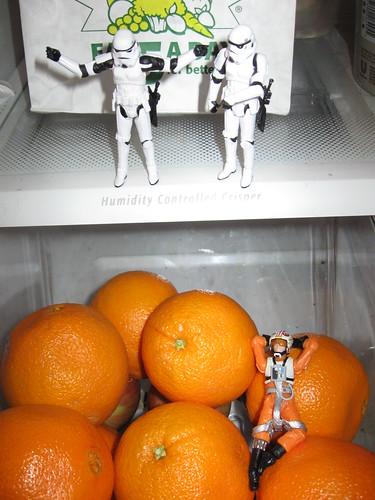
Baby, originally uploaded by gabi_menashe.

(This is a guest post by Asheesh Laroia of OpenHatch, an “open source involvement engine.” OpenHatch is a website and ongoing project to help new contributors find their place in free software projects. A few months ago, he imported some bugs in KDE’s bug tracker into the OpenHatch volunteer opportunity finder. I invited him to write about it for my blog. OpenHatch has its own blog, too.)

KDE is doing something wonderful with its Junior Jobs. These are issues (often small feature requests) that are appropriate for a first-time contributor. When maintainers create these opportunities, they take information that would otherwise be trapped in their head — how easy or hard an issue is — and make it available as hint to new contributors. Conveniently, creating a “Junior Job” doesn’t take any special work: maintainers just have to find the relevant bug in KDE Bugzilla and add the junior-jobs keyword.

But KDE Bugzilla isn’t necessarily a friendly welcome mat. Probably everyone reading this post can remember a time when Bugzilla seemed like a difficult, arcane tool. Bugzilla works well (enough) as an interface for project maintainers to share the status of what they’re working on with each other.

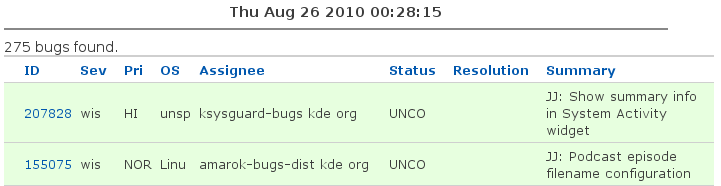
But imagine you are a prospective contributor. Aim your web browser at the list of junior jobs. (To get that link, I went to KDE Bugzilla and clicked the “Junior Jobs” link on the left side.) This is what I saw when writing this post:

Here are some questions I might have as a new contributor (and some commentary as myself):

  • What do “wis” and “UNCO” mean?
  • Who is JJ? (Maybe that’s a person’s initials; maybe he or she plans to fix it.)
  • What project are these bugs in? (I can guess from the assignee….)
  • Where do I get the source code? (The wrong answer might lead the new contributor to submit a patch against the most recent release; that patch might not apply against trunk.)
  • If I get started on this, who can help me when I get stuck? (Otherwise, a new contributor might make an effort, become confused by something, and fall away.)

I like to joke that bug trackers say lots of information about what the problem is, but they don’t provide any information on how to solve it.

We at OpenHatch noticed that a great number of projects were in a similar situation: they label bugs as “easy”, “bitesize”, or “Junior Jobs” and point first-time contributors straight at the bug tracker. So we created what we call the volunteer opportunity finder to help people find something to work on. It wakes up late at night to download issues from bug trackers representing hundreds of projects. (Since OpenHatch is itself a free software project, we also import the bitesize bugs from our own bug tracker.)

When you browse the available issues, you can click on the project name and see its page on OpenHatch. (We make one for every project that someone says they’ve contributed to, or where we’ve imported bugs for it.) The pages showcase the people who have listed themselves as possible mentors. Contributors can also write instructions or suggestions for how to get involved; for example, the page for Gally does a great job of answering “Other than writing code, how can I contribute?”

If you don’t know how to get involved, you can also browse opportunities by programming language, the kind of help you want to give (such as writing documentation) or flip through a few projects you might want to work on. You can narrow your search to just the ones we call “bitesize” (“Junior Jobs” in KDE, bugs labeled as “easy” in the Python programming language, and so forth).

So OpenHatch is a project to think through how people join free software communities and to build technical tools and social structures to make that better. This browsing tool is one thing we’ve built. It’s a community project, so you can help out! Say hi on IRC or email if you want to join in.

I’d like to hear (in the comments on this post) from you guys and gals: What do you think about our “volunteer opportunity finder”? What works about it for you? What would you change?

If Lydia invites me back, I plan to write about getting non-coders more involved in free software projects. During the weekend I first met Lydia and Jeff Mitchell of Amarok, I had a crazy idea for something you can build on top of OpenHatch. If you want to stay in touch until then, join our IRC channel or subscribe to us on Identi.ca/Twitter/RSS!

KDE SC 4.5 release parties – let’s get them started!

Filed under: Amarok,AmarokBlog,KDE,Kubuntu,PlanetKDE,PlanetKubuntu,linux — Lydia at 1:06 am on Tuesday, July 27, 2010

I’m back from conference touring (which was awesome btw – more about that later) and Tom reminded me that the release parties for 4.5 are not planned yet. And the release is planned for August 4th, so in a bit more than a week. OMG!

Clearly it is time to fix this situation and give the world a chance to meet some cool KDE people. So go to the 4.5 release party planning page and check if there is one near you already. If there is one then sign up for it and have fun. If there is none yet it’s time to start one. Pick a date and time (preferably within 3 weeks of release) and reserve a place in a local restaurant, bar, meeting room, university, whateverelsefits. Add it to the wiki page, spread the word and then have lots of fun.

Of course it’s my pleasure to announce the first of hopefully many release parties: Stuttgart, Germany on 7th of August. Exact place and time is still to be determined. Check the wiki page every now and then for updates.

For those who have never planned or attended a release party: You can do pretty much everything you want from simply getting together for a beer and chatting to full day event with talks, workshops and so on. It’s up to you. You can find a few tips on the community wiki. Everyone is welcome from active contributor to interested user. Just let the person organizing it know you’re coming so they can plan better.

It’s been fluffy

Filed under: Amarok,AmarokBlog,KDE,Kubuntu,Parley,PlanetKDE,fotos,linux — Lydia at 9:52 pm on Sunday, May 30, 2010

I’m back at home from the multimedia and edu sprint in Switzerland (yea the one some people call cheeseland and others chocolateland) and things are finally getting back to normal so time for a bit of blogging. It was productive, fluffy and awesome! Those three pictures sum it up pretty well ;-)
Rock!
Tomaz
view from my room
Check out my Flickr page for more pics.

Having a lot of projects at the sprint was really great. For example I’ve worked with j-b of VideoLan fame on some announcements and website restructuring and helped the edu team with promo and community building advice. A lot of progress has been made on the VLC backend for Phonon which will hopefully solve a lot of the small pain points we still have in Amarok. Besides getting the VLC backend in shape the next weeks in Amarok land will be spend on improving startup time for example. New script bindings by Ian and Richard should help quite a bit with that hopefully. Colin did not have an easy job being the PulseAudio guy but he was a really good sport in not-so-friendly territory ;-) . We also had a telephone meeting with the QtMultimedia guys in Brisbane which cleared up quite a few things even though the setup of the meeting was a bit adventurous. Sharing knowledge not only inside the KDE teams but also meeting with other free software teams like this is invaluable and should be done more often.

A big thank you to everyone who helped make it possible. You’re fluffy.

Oh and btw: Car trains rock.

Ada, meet Katie’s posse!

Filed under: Amarok,AmarokBlog,KDE,Kubuntu,PlanetKDE,PlanetKubuntu,linux — Lydia at 2:07 pm on Wednesday, March 24, 2010

Role models are key to getting more women and especially young girls interested in science and technology and specifically open source. And here are some of KDE’s finest :)   Will you be one of them next year?

Ada Lovelace Day, video by fabulous Alexandra

Unfortunately not in the video but still very awesome: Alex, Ana Cecília, Ana, Chani, Claudia, Sabine, Valerie, Valorie, Vera and many more.

KDE accepted for GSoC 2010

Filed under: Amarok,AmarokBlog,KDE,Kubuntu,Parley,PlanetKDE,PlanetKubuntu,linux — Lydia at 9:08 pm on Thursday, March 18, 2010

KDE has once again been accepted as an org for GSoC. Yay! This means we’ll once again be welcoming a bunch of great students into our team to make KDE software rock this summer.

So what to do now?
If you’re a student who wants to take part in GSoC this year: Go and check out the ideas page and pick one you like or come up with your own idea. Then get in touch with the team working on the program you want to contribute to over the summer. Work with them to write a kick-ass proposal and then hopefully make it reality this summer. To keep up with all things GSoC you can also subscribe to the kde-soc@kde.org mailing list.

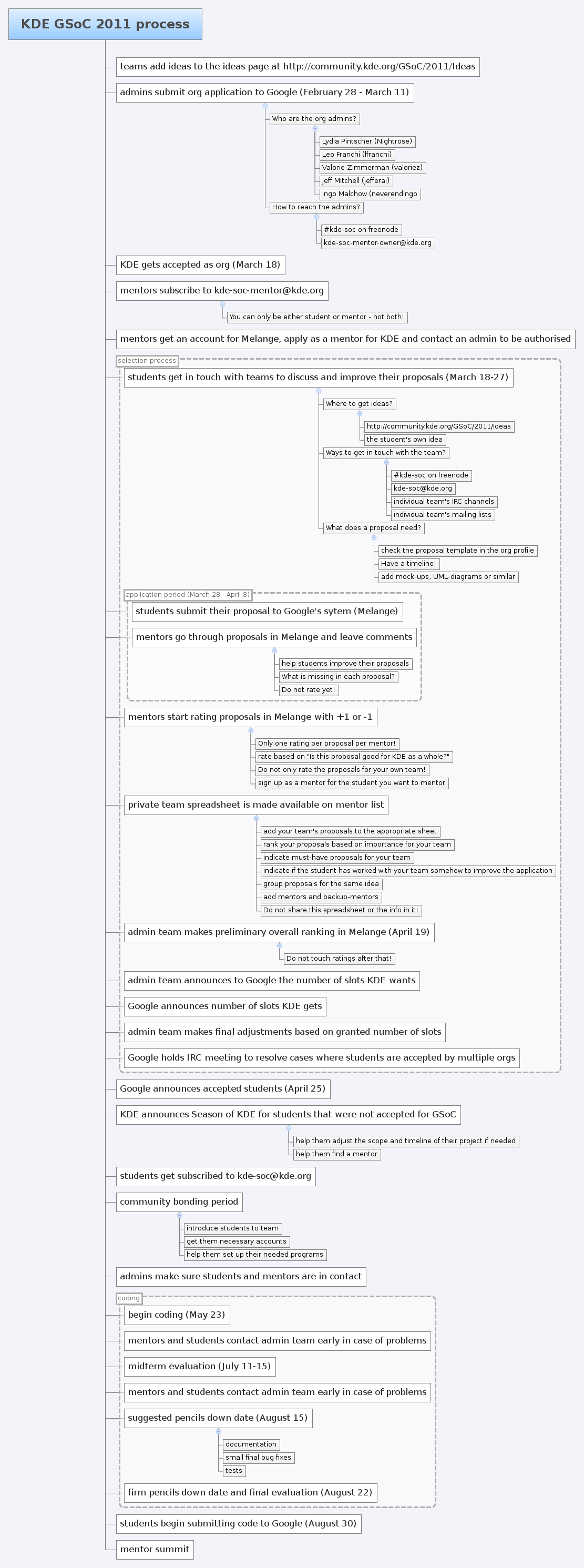
If you’re a potential mentor: Go and check out the flow chart below. It has everything you should need to know about how we’re doing GSoC this year. Then go and subscribe to the kde-soc-mentor@kde.org list. Further announcements for mentors will be made there.

If you have any questions please join us in our IRC channel #kde-soc on freenode or send an email to the kde-soc mailing list.

KDE GSoC process 2010

GSoC info session in Karlsruhe

Filed under: Amarok,AmarokBlog,KDE,Kubuntu,PlanetKDE,PlanetKubuntu,linux,university — Lydia at 1:07 am on Monday, March 8, 2010

Since Google Summer of Code is coming up again very soon Sven, Phil and I will be doing a short info session at the University of Karlsruhe on Thursday at 4pm in room HS -101 in building 50.34 (Infobau). We’ll be giving a short intro to GSoC and tell a bit about how GSoC works in KDE and Debian and of course answer lots of questions. If you’re planning to apply this year you should definitely show up :) Please drop me a short email if you want to attend at lydia at kde org.

If you’re not in Karlsruhe or anywhere near there are info sessions in other cities around the world listed in the GSoC calendar.

KDE Education Survey

Filed under: AmarokBlog,KDE,Kubuntu,Parley,PlanetKDE,PlanetKubuntu,linux — Lydia at 8:16 pm on Saturday, November 21, 2009

We must not believe the many, who say that only free people ought to be educated, but we should rather believe the philosophers who say that only the educated are free. – Epictetus

The KDE-Edu team is looking for feedback from their users to improve their applications and to find out where to invest the limited time they have. If you are a student, teacher or just casual user of any of these applications we are looking for your feedback:

  • Kanagram
  • KHangMan
  • Kiten
  • KLettres
  • KWordQuiz
  • Parley
  • KAlgebra
  • KBruch
  • Kig
  • KmPlot
  • Blinken
  • KGeography
  • KTouch
  • KTurtle
  • Kalzium
  • KStars
  • Marble
  • Step
  • Cantor
  • Rocs

We created a short survey (1 page – about 5 minutes) where you can tell us about the 3 problems you have with any of the applications listed above as well as give some general feedback. Those 3 problems can be small or big. We want to know about them. This feedback is incredibly valuable to the team so if you know anyone who should take this survey but doesn’t read this blog please send them a link.

Make KDE-Edu rock even more!

PS: If you want to help with any of the programs listed above (by writing code, creating example content, documentation, promotion or anything else) please get in touch with me.

What People Are (Really) Saying About Windows 7

Filed under: AmarokBlog,KDE,Kubuntu,PlanetKDE,PlanetKubuntu,social media — Lydia at 3:53 am on Sunday, November 8, 2009

Remember my Social Media Guide For Free Software Projects? Skreech was so kind to point me to a really great un-example site: Microsoft’s social media page for Windows 7, where they show what people are saying about it. Go take a look.

Now there are a few interesting things to mention about this page.

Quite fast, huh? Lots of people talking about it. Are those messages real-time? Nope. The page is just made to give you the impression they are. I picked a few random ones and got pretty much everything between 3 hours and 8 days old. See the slider at the top? Yea you can slow it down to actually be able to read it unlike the default.

If you feel like it just watch it for a few minutes and watch the same messages appear again. It started to loop after about 10 minutes here.

Now let’s take a look at the actual content of the messages shown. Windows 7 must be the most awesome operating system out there. In the 30 minutes or so I watched the stream there were 2 messages with a slightly negative touch. Every single other message praised it. Every single one. Now call me biased but I don’t believe it. So I had a look at the actual Twitter search page for Windows 7 and Win7. And indeed you find tweets, that are less positive, like this, this, this, thisthis, this, this, this, this, this or this. They do however have little stabs at Linux and Apple in their selected tweets (“I though Apple had it together but with Win7 out of the door they better get moving.” and similar.). This page seems to indicate that they do indeed filter for family friendliness and so on. Fair enough. But it also says that they do not filter out the negative stuff. Uhhhhm yes you do.

The Facebook messages are taken from the Windows fan page on Facebook. Now my guess is that the audience of said fan page is slightly biased ;-) but I’ll let that one slide as there aren’t a lot of good ways to get such messages out of Facebook.

There is probably more but those are the things that immediately jumped into my eye. Please leave comments if you find other gems.

Now the sad thing is: From my quick check of Twitter and Co it seems that Windows 7 is indeed good according to quite a few people. There are indeed a lot of people tweeting about it. There would have been no need to hide behind filtering and sneaky web-apps trying to create an illusion of a lot of communication. This would have been a great opportunity to show what people really think about it and gain credibility. But it failed. It failed to be honest and instead took the secure way. If you want to take the secure way stay away from social media!

Wanna learn how to do it right? Get in touch with me and have a look at buzz.kde.org (which is indeed live and unfiltered and could use some coding help – ping me if you want to help).

Sunjammer

Filed under: Amarok,AmarokBlog,KDE,Kubuntu,PlanetKDE,PlanetKubuntu,linux — Lydia at 5:05 pm on Thursday, October 1, 2009

In the last 14 weeks the Amarok team has been working hard to get Amarok 2.2 ready for prime-time. We’ve worked in dark cellars, in a nice living room in front of a warm fire, at the beach, at airports, in cabins in the wood, on the train – yea you get it – pretty much everywhere.

Today we can finally present you the result. Amarok 2.2 is out in the wild and brings lots of goodies people have been waiting for. Check out the release announcement and please digg it!

With that I say bye bye and run off to a very sunny island with my fellow rokers – oh wait, no – we gotta prepare 2.2.1. Stay tuned ;-)

More serious though: I’m getting ready for the GSoC mentor summit. Soooo excited.

Tune your Quassel!

Filed under: AmarokBlog,KDE,Kubuntu,PlanetKDE,PlanetKubuntu,linux — Lydia at 11:02 am on Saturday, September 26, 2009

If you would do a quick analysis on which programs I use the most you’d probably get Firefox, Quassel, Amarok and Kopete (in this order and Firefox being way ahead of everything else). Using those programs extensively of course leads to optimizing workflows.

Quassel is the fourth IRC client I use now. MIRC back on Windows. Then I learned to love Konversation when I switched to Linux. At some point I got tired of missing stuff when I was offline so I got shell access on a friends server to run irssi. It was ok and I customized the hell out of it to fit my needs pretty perfectly but I always missed Konversation’s nice GUI. I’m just not the type that really enjoys a CLI app (well except for listadmin maybe – but more about that another time). And then came Quassel, developed by a good friend of mine. I got a GUI and always-online in one app without hacks. Heaven! Well ok – close to heaven. There were a few usability issues that thankfully got fixed with help by Celeste. But one thing is still problematic: Quassel keeps all queries (private chats) in your default channel list. (Konversation had (has?) this nice feature that it closes inactive queries after a while and they are gone after a restart anyway so your channel list doesn’t grow too huge.)  With a huge list of queries (not hard to achieve if you’re using IRC for a while) you easily miss new messages in Quassel. Since I noticed a few people having this problem I’ll share how I tuned my Quassel to never miss queries again.

I have 2 chat lists. One with all my channels and queries and another one with only new stuff – that means unread channels and queries. It looks like this:

Quassel channel buffer

Once I read and leave the queries again they are removed from the news chat list – same for the channels. A nice side effect of this is that I can easily manage a lot of channels even on the small screen on my netbook without scrolling.

To set this up go to View -> Chat Lists -> Configure Chat Lists.

Settings for my All Buffers chat list:

Quassel All Buffers

Settings for my news chat list:

Quassel news chat list

How about a list of only new queries? Easy:

Quassel queries-only

How about a chat lists with only channels with highlights? There you go:

Quassel highlights-only

Enjoy and never get angry looks from friends again for missing a query ;-)

How did you tune Quassel?

Next Page »